Laser cutting can leave a clean edge—or a rough one marked by burrs, dross, and dark discoloration. The difference is rarely mysterious. It often comes down to how the beam, material, assist gas, and cutting speed interact. A narrow kerf may widen when the focus shifts; thick plate can retain molten metal along its lower edge. Small setup changes matter.
For readers asking “what are common defects in laser cutting processes,” the usual signs include excessive dross, incomplete cuts, rough edges, heat-affected zones, and corner overburn. John Powell, a laser-processing researcher and author of CO2 Laser Cutting, emphasizes a practical principle in his work: cutting quality depends on the interaction between the laser and the material, not on power alone. That is why the same machine settings may produce different results on stainless steel and mild steel.
Diagnosis starts with the cut itself. Check whether dross appears along the full underside or only near corners. Inspect the nozzle for damage, confirm the focus position, and review gas pressure and feed rate. These clues help separate a parameter issue from contamination or worn components. Still, operators can blame the machine too quickly. I have seen a tiny focus error dismissed as “bad material.” That assumption deserves a second look. Understanding the defect’s pattern is the first step toward a reliable correction.
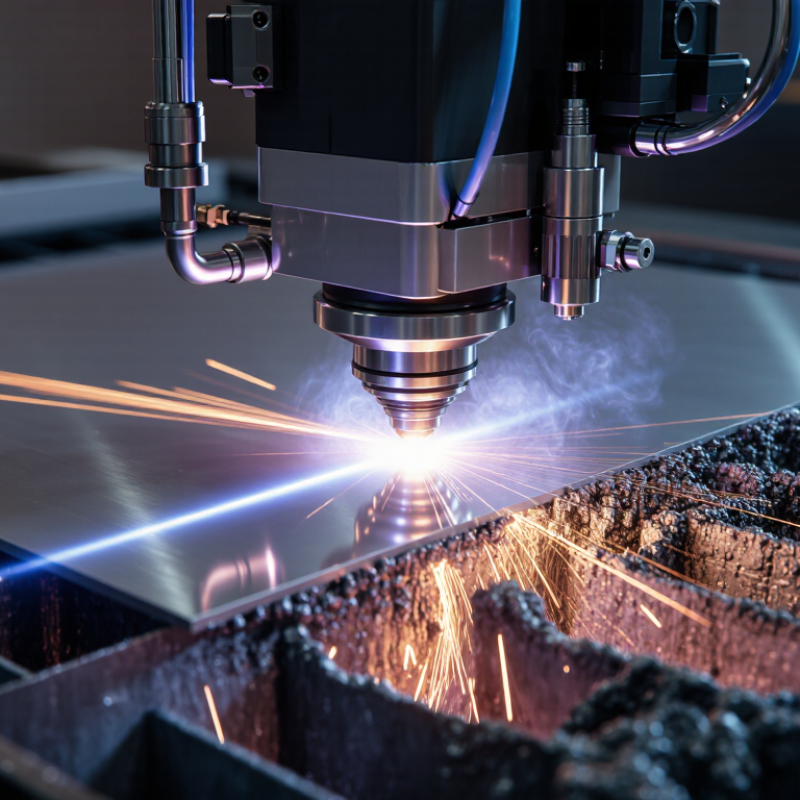
A laser-cut edge forms as a focused beam heats a narrow path through the sheet. The material melts or vaporizes, while assist gas pushes molten material through the kerf. The beam’s focus, cutting speed, and gas flow shape the edge. On a steel plate, for example, a steady cut may leave fine, even striations. Heat matters. If the beam travels too slowly, excess heat can widen the kerf or leave a rough, heat-darkened edge.
Defects often appear when energy and material removal fall out of balance. A fast feed may leave uncut tabs; poor focus can create a wider top opening and a narrower bottom. Low or uneven gas flow may leave dross—small beads of resolidified metal—under the cut. Material composition and thickness also affect results, so settings that work on one sheet may not transfer neatly to another. That part is easy to overlook.
Tips: Check the cut face and underside, not just the top surface. Change one setting at a time, then make a short test cut on the same material and thickness. Keep the nozzle clean and centered. Small changes show. Record the settings alongside the observed edge quality; a test can still mislead if the sheet or surface condition changes.
A laser-cut edge tells a visible story. A clean cut usually has a narrow kerf and fairly even edges. Fine, regular lines may appear on the cut face, especially in thicker material. They should not look deeply torn or widely spaced. Look closely. A small amount of residue can be normal, but heavy deposits deserve attention.
Dross appears as rough beads or a hard, uneven lip along the lower edge. It may cling beneath the part and feel sharp to the touch. A burr, by contrast, is a thin raised edge left around the cut. Both can make parts difficult to fit together. Their appearance varies with material, thickness, and settings, so one photograph rarely tells the whole story.
Discoloration can show as a straw, blue, or darkened band near the cut, particularly on metals affected by heat. Excessive heat may also leave a wider heat-marked zone. Incomplete cutting looks different: small bridges of uncut material remain, or the part stays attached at corners. A tapered edge, wider on one face than the other, can signal uneven cutting conditions. Yet appearance alone can mislead. Check several edges under consistent lighting, and compare the top and underside before deciding what went wrong. I still find subtle discoloration easy to overread. The cut face may reveal more than the surface.
Material properties shape how heat moves through a cut. Copper conducts heat at about 400 W/m·K near room temperature, according to Copper Development Association technical data. ASM Handbook tables show many carbon steels near 50 W/m·K, though grades and temperatures vary. That gap matters. Copper carries heat away quickly, so a cut may need carefully tuned power and speed. Its reflectivity also affects how much laser energy the surface absorbs. In steel, heat tends to remain more concentrated, which can enlarge the heat-affected zone or leave dross when settings are poorly matched. Alloying elements and surface scale add further variation. A familiar recipe may fail on a new sheet.
Tips: Check the material certificate, thickness, and surface condition before cutting. Run a short test, then inspect the underside for burrs and the edge for discoloration. Change one setting at a time. Small changes matter.
One caveat: conductivity alone cannot predict the result. Focus position, assist-gas flow, and nozzle condition also influence edge quality. Still, recording material grade alongside power and speed makes troubleshooting less like guesswork. A batch with mixed thickness or coatings can behave inconsistently, even when the machine settings stay fixed.
Burrs, rough edges, and discoloration often trace back to mismatched process settings. Cutting speed is a common culprit. Move too quickly, and the beam may not fully penetrate; move too slowly, and excess heat can widen the kerf or leave a heavy burr. The right speed depends on material type and thickness, so copying settings from another job can mislead.
Power, focus position, and assist-gas pressure interact. A focus point set too high or low can produce tapered edges and uneven kerfs. Insufficient gas pressure may leave molten metal attached beneath the cut. Excessive pressure can disturb the melt flow and roughen the edge. Small changes matter. Check the actual cut face, not just the machine display.
ISO 9013:2017 assesses thermal-cut quality through measurable features including perpendicularity tolerance and profile height. These measurements show why a shiny edge alone does not prove a precise cut. In practice, test cuts on the same material batch help reveal drift from nozzle wear, lens contamination, or sheet variation. Even then, one variable at a time is not always realistic; settings interact, and that is easy to underestimate. Keep a record of material thickness, speed, focus, and gas pressure alongside cut-quality measurements.
Why Do Common Laser Cutting Defects Occur?
How to Identify and Reduce the Root Causes of Defects
Cut edges often reveal more than a finished part does. Burrs or heavy dross on the underside can point to poor melt removal, incorrect cutting speed, or unstable assist-gas flow. Discoloration may signal excess heat, while incomplete cuts can result from low power, a dirty nozzle, or inconsistent material thickness. Look closely.
Inspect several parts, not just one. Note where the defect appears, whether it repeats along the cut, and which material batch was used. Check the nozzle for damage or residue, and verify that the protective window and optical path are clean. A rough edge alone cannot identify the cause; similar marks can come from different settings or maintenance issues.
Change one variable at a time. Use a small test coupon to adjust focus, speed, power, or gas pressure, then compare the cut edge and underside. Record settings and results, including when a change makes the cut worse. That part matters. Material surfaces and thickness can vary, so a setting that worked yesterday may not work today. If defects persist, inspect the machine and gas delivery before repeatedly increasing power.
How focus and energy distribution can contribute to poor cut quality
How to read this chart: It shows an idealized Gaussian beam profile. Intensity falls away from the beam center; incorrect focus or beam alignment can reduce energy at the cut and contribute to incomplete cuts, dross, or rough edges.
Root-cause checks: Inspect focus position and lens condition, verify nozzle alignment and standoff, and check cutting speed, power, and assist-gas pressure. Actual results depend on the material, thickness, and machine setup.
Burrs often form when speed, power, or assist-gas flow does not suit the material. Check the underside for attached metal.
Incorrect focus, unstable gas pressure, or unsuitable speed can roughen an edge. A rough cut alone does not reveal the cause.
Excessive speed, low power, a dirty nozzle, or uneven sheet thickness may contribute. Inspect the nozzle and material, too.
It may indicate excess heat, often from a slow cut or mismatched settings. Check several parts before changing the process.
Compare the defect’s location across several parts and note the material batch. Look closely. Similar marks can have different causes.
Inspect the nozzle for residue or damage, and check that the protective window and optical path are clean. Also verify gas delivery.
Cut a small coupon from the same material batch. Adjust one setting, then compare the edge and underside.
Record thickness, speed, focus, gas pressure, and cut quality. Include changes that made results worse. That matters. A setting that worked yesterday may fail today.
Laser cutting forms a cut edge when a focused beam heats and melts or vaporizes material, while an assist gas helps clear the molten material from the kerf. The quality of that edge depends on how consistently energy is delivered and removed. Common defects may include excessive burrs or dross, rough or angled edges, incomplete cuts, discoloration, and heat-affected zones. Understanding what are common defects in laser cutting processes makes it easier to distinguish visible symptoms and trace them to their causes.
Material thickness, composition, reflectivity, and thermal behavior can all influence how a workpiece responds to the beam. Defects can also arise from unsuitable power, cutting speed, focus position, gas pressure, or nozzle condition. A systematic inspection of the edge, combined with checks of the material and cutting setup, helps identify the root cause. Adjusting one factor at a time and verifying the results can improve cut consistency and reduce waste.

Stylo Laser